
Introducing Bookworm Library — Your Personal Book Collection, Always With You

Coming soon to iPhone, iPad, and Mac
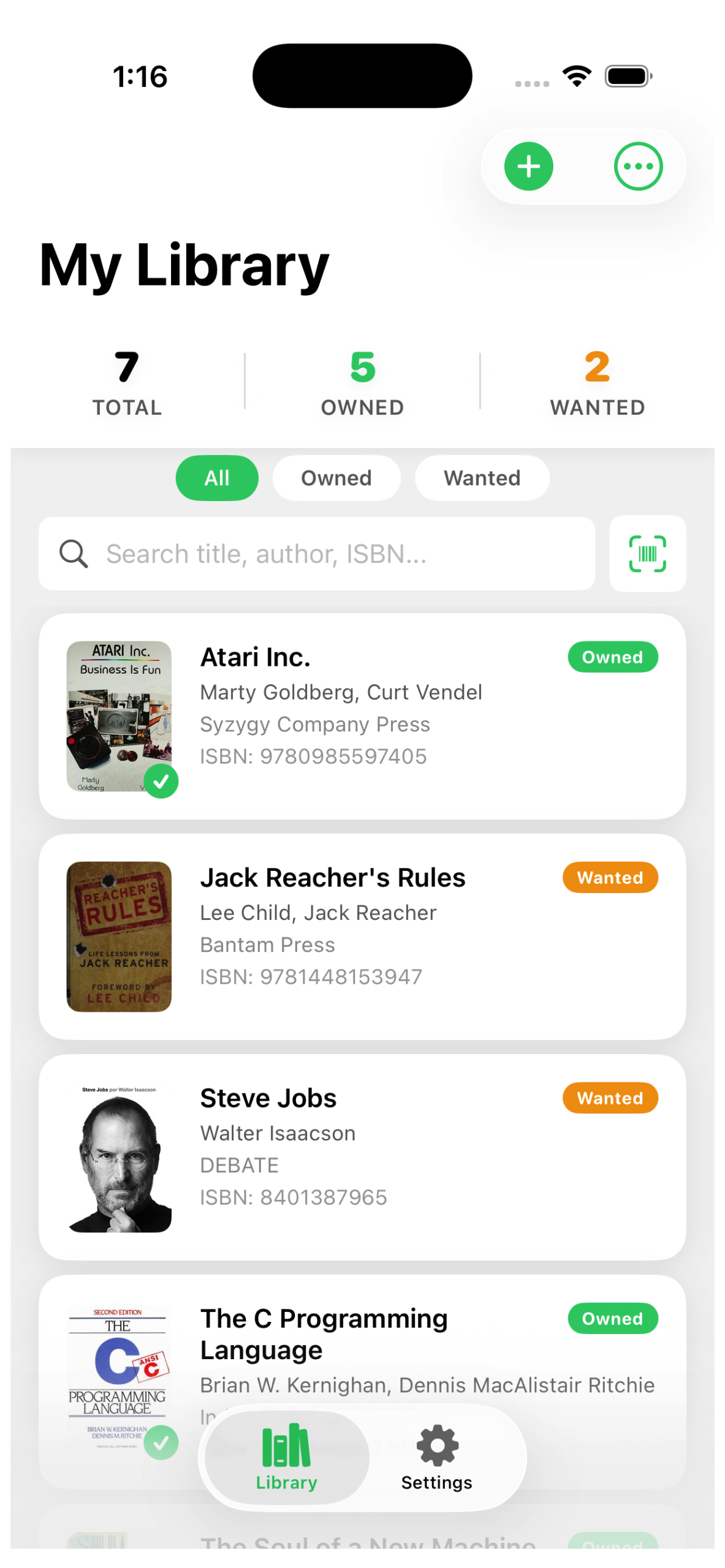
If you’re anything like us, your book collection tells a story of its own. Shelves overflowing with titles you’ve loved, stacks of books you mean to get to, and that nagging feeling in a bookshop — do I already own this one? We built Bookworm Library to solve exactly that.

Bookworm Library is a beautifully simple app for cataloguing your personal book collection, and it’s coming soon to iPhone, iPad, and Mac.

What Is Bookworm Library?

At its heart, Bookworm is a personal library manager. You add books you own, books you want, and everything in between. It’s your reading life, organised.

What makes it different is the experience. Adding a book takes seconds — just point your camera at the barcode on the back cover and Bookworm does the rest. It pulls the title, author, publisher, and cover art automatically, so you spend less time typing and more time reading.

No subscription. No cloud account required. Your library lives on your device, private and always available — even offline.

Key Features

  • ISBN Barcode Scanner — Scan the back of any book to add it instantly. Perfect for cataloguing a whole shelf in minutes.
  • Owned & Wanted Lists — Track what you have and what you’re after. Green for owned, amber for your wish list.
  • Smart Search — Find any book by title, author, publisher, or ISBN. Scan a barcode in a shop to instantly check if you already own it.
  • Sort & Filter — View your whole library, just owned books, or just your wish list. Sort A–Z or Z–A with a tap.
  • Export & Print — Export your entire collection to a spreadsheet, or generate a beautifully formatted PDF to print or share.
  • Dark Mode — A clean, adaptive design that looks great in light and dark mode and feels right at home on any Apple device.

Built for Apple Devices
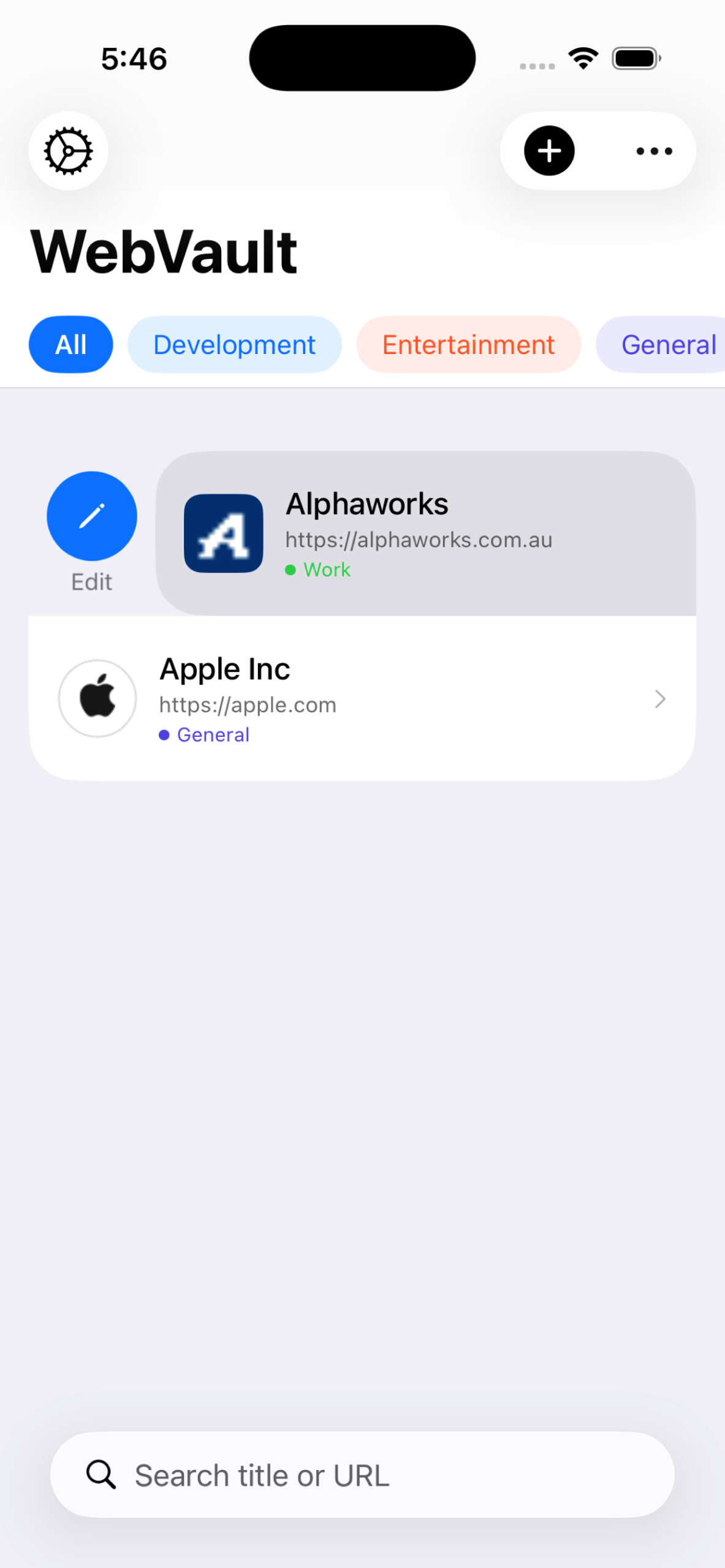
A Bookmark Manager That Actually Works

WebVault is a clean, fast, and private bookmark manager coming soon to iPhone, iPad, and Mac. It’s designed for people who take the web seriously — researchers, developers, designers, writers, or anyone who regularly finds things worth keeping.

Add any website in seconds. Assign it to a colour-coded category. Add a note if you need context. That’s it. No friction, no clutter, no rabbit holes.

Save From Anywhere

The feature we’re most excited about is the Share Extension. From Safari or any other app, tap Share and choose WebVault — your bookmark is saved instantly without ever leaving what you were doing. No copying URLs, no switching apps, no losing your place.

Always In Sync

Your bookmarks live in your own iCloud account, syncing automatically across every Apple device signed in with your Apple ID. Add something on your iPhone during your commute and it’s waiting for you on your Mac when you sit down at your desk.

Know Your Links Are Alive

There’s nothing more frustrating than clicking a saved bookmark only to find it’s gone. WebVault quietly checks your bookmarks in the background and places a small warning badge on any link that can’t be reached — so you always know the health of your collection at a glance. You can also re-check any bookmark on demand from its detail view.

Private by Design

WebVault collects no analytics, requires no account, and sends no data to our servers. Your bookmarks are yours — stored locally and in your personal iCloud. That’s how it should be.

Coming Soon

WebVault is finishing up testing now and will be available on the App Store for iPhone, iPad, and Mac very soon. We’ll have pricing and a release date to share shortly.

If you’re the kind of person who’s been looking for a bookmark manager that’s simple without being basic, and private without being complicated — this one’s for you.